

Cleaning data is one of the most common tasks analysts face, and duplicates are often the biggest culprit. Whether they come from ingestion issues, late‑arriving events, or simple human error, duplicates can distort aggregates, inflate metrics, and break downstream SQL logic.
BigQuery offers a beautifully clean way to handle this: the QUALIFY clause. If you’ve ever written a subquery just to filter a window function, QUALIFY is about to become your new favourite SQL feature.
This guide walks through what QUALIFY does, how it compares to WHERE and HAVING, and how to use it to identify and remove duplicates using simple, reusable SQL patterns.
Where QUALIFY Fits in the SQL Workflow
Before diving into examples, it helps to understand how QUALIFY sits alongside the clauses you already know:
- WHERE filters rows before any grouping or window functions
- HAVING filters rows after grouping (aggregations)
- QUALIFY filters rows after window function
A simple way to remember it:
- Use WHERE for raw row‑level filters
- Use HAVING for aggregated filters
- Use QUALIFY for window‑function filter
What the QUALIFY Clause Does
QUALIFY lets you filter on the results of a window function after it has been calculated.
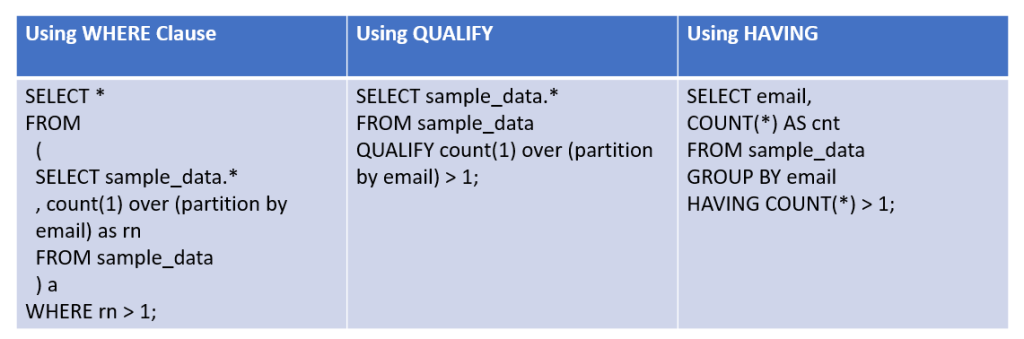
Without QUALIFY, you’d need a subquery like this:
With QUALIFY, you can write:
It’s cleaner, easier to read, and keeps the logic in one place.
Why QUALIFY Is So Useful
QUALIFY is becoming a standard pattern in modern SQL because it:
- avoids unnecessary subqueries
- keeps window logic and filtering together
- improves readability
- reduces indentation and nesting
- makes deduplication patterns easy to teach and reuse
If you’re building analytics pipelines, dbt models, or BI‑ready tables, is one of the cleanest tools you can add to your SQL toolkit.
Sample Data with Duplicates
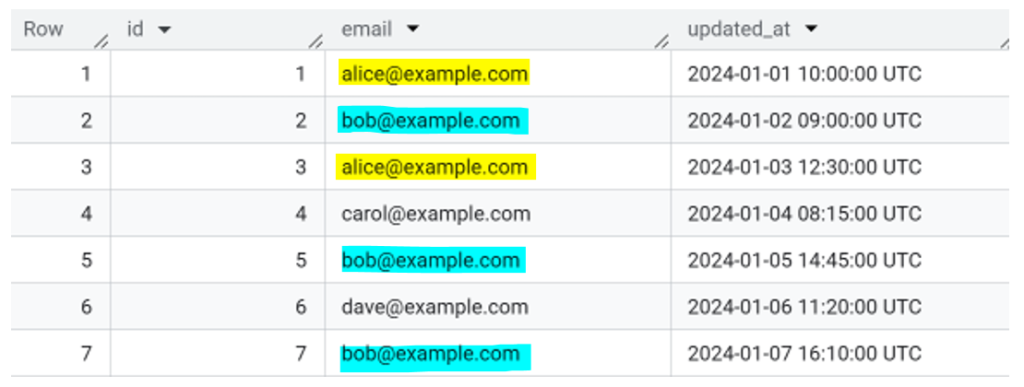
Here’s a small dataset you can paste straight into BigQuery:
WITH sample_data AS (
SELECT * FROM UNNEST([
STRUCT(1 AS id, “alice@example.com” AS email, TIMESTAMP(“2024-01-01 10:00:00”) AS updated_at),
STRUCT(2 AS id, “bob@example.com” AS email, TIMESTAMP(“2024-01-02 09:00:00”) AS updated_at),
STRUCT(3 AS id, “alice@example.com” AS email, TIMESTAMP(“2024-01-03 12:30:00”) AS updated_at),
STRUCT(4 AS id, “carol@example.com” AS email, TIMESTAMP(“2024-01-04 08:15:00”) AS updated_at),
STRUCT(5 AS id, “bob@example.com” AS email, TIMESTAMP(“2024-01-05 14:45:00”) AS updated_at),
STRUCT(6 AS id, “dave@example.com” AS email, TIMESTAMP(“2024-01-06 11:20:00”) AS updated_at),
STRUCT(7 AS id, “bob@example.com” AS email, TIMESTAMP(“2024-01-07 16:10:00”) AS updated_at)
])
)
SELECT * FROM sample_data;
Duplicates:
• alice@example.com : appears twice
• bob@example.com : appears three times
Perfect for demonstrating deduplication.
Finding Duplicate Rows with QUALIFY
The core pattern looks like this:
SELECT *,
ROW_NUMBER() OVER ( PARTITION BY email ORDER BY updated_at DESC
) AS rn
FROM sample_data
QUALIFY rn > 1;
What Each Part Does:
- PARTITION BY email : defines what counts as a duplicate
- ORDER BY updated_at_DESC : ranks the newest record first
- ROW_NUMBER() : assigns a unique number to each row in the group
- QUALIFY rn > 1 : returns only the duplicates
This gives you all rows except the most recent one for each email.
This gives you all rows except the most recent one for each email.

This screenshot shows the duplicate rows returned by the query. Each row has an rn value greater than 1, which means it isn’t the most recent record for that email.
Keeping Only the Latest Record
To keep the newest version of each row:
SELECT
*
FROM sample_data
QUALIFY ROW_NUMBER() OVER (PARTITION BY email ORDER BY updated_at DESC
) = 1;
This is ideal for:
- Slowly changing dimensions
- Event logs
- Incremental ingestion
- Cleaning dimension tables before loading into BI tools
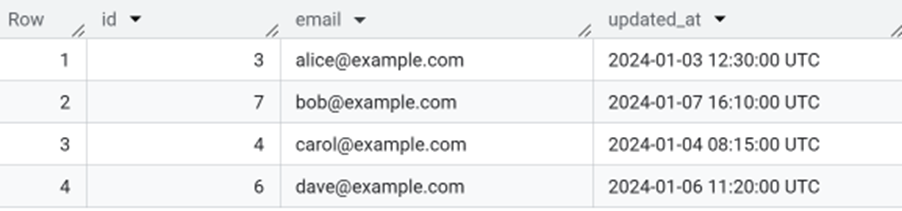
This screenshot shows the latest record for each email, with only the most recent value kept and all older duplicates removed.
WHERE Still Matters
If you want to filter the raw dataset before running window functions, use WHERE:
SELECT * from
(
SELECT sample_data.*
, count(1) over (partition by email) as rn
FROM sample_data
) a
WHERE rn > 1
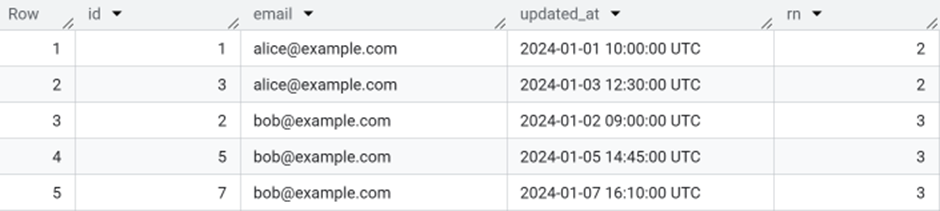
This output shows the rows where each email appears more than once, with the rn value indicating how many times that email occurs across the dataset.
Where HAVING Still Matters
If you only want to know which keys are duplicated (not the full rows), HAVING is still the right tool:
SELECT email, COUNT(*) AS cnt
FROM sample_data
GROUP BY email
HAVING cnt > 1;
Use HAVING when you’re filtering on aggregated values.
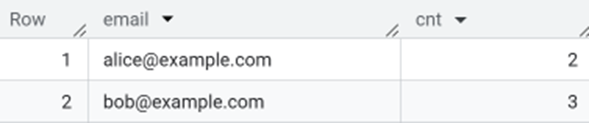
HAVING is useful when you want to return one row per group and filter based on an aggregated value, like showing only the emails that appear more than once.
Comparing WHERE vs HAVING vs QUALIFY

Reusable Templates
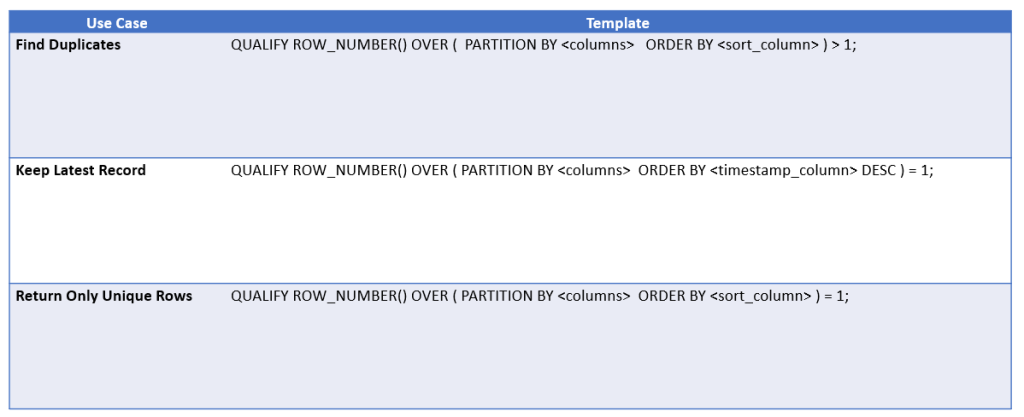
These templates turn the examples above into simple, reusable patterns you can plug into your own queries
Conclusion
QUALIFY is one of those features that instantly improves your SQL.
It makes deduplication clearer, reduces boilerplate, and keeps your logic in a single, readable block.
If you’re working in BigQuery and still using subqueries to filter window functions, switching to QUALIFY will make your code cleaner and easier to maintain.
If you’d like to explore more:
Head over to our Business Analytics Blog for insights, walkthroughs and scenario-driven guides
“Find more streamlined patterns like this in our BigQuery Utils Repository on GitHub.”
Or visit our SQL Glossary and BigQuery Glossary for clear, beginner friendly definitions