

An Introduction to the SQL COALESCE function
The SQL COALESCE function is a simple, efficient function to handle NULL values in your SQL queries. This quick guide shows you how it works, how it compares to using some alternative approaches and common use cases The SQL COALESCE function returns the first non-null value in a list. It is a very useful function for dealing with NULL values in SQL queries, but managing complex null logic at scale often requires a more strategic approach to database design. At our SQL consultancy, we specialise in these types of data integrity challenges, helping businesses move beyond basic functions and into professional-grade data engineering.SQL Coalesce syntax
The syntax for the COALESCE function is: COALESCE(expression1, expression2, [expression3, …]); As you can see above, you are not limited to just two expressions. You could use coalesce to check for a broad range of columns and it will return the first one in the sequence that is not a NULL valueSQL Coalesce Example
In its simplest form, SQL coalesce can be used to check for a NULL value and return an alternative value SELECT ds.* , coalesce(StoreName, City) as StoreName_Clean FROM [SelectDistinctTIPS].[dbo].[Dim_Store] ds This example returns values from the storename column, but if that is missing it return the City value. This only works if the City field has a value You can see that Store number 2 returns Leeds from the city column, but store 4 returns a NULL value because both values are NULL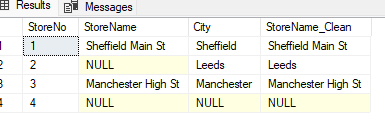 You may need to do this if subsequent processes for the data do not allow values to be NULL
Adding more options
If we then want to add a third option as a last resort that returns an error value, we can do this SELECT ds.* , coalesce(StoreName, City, ‘ERROR – Details Missing’) as StoreName_Clean FROM [SelectDistinctTIPS].[dbo].[Dim_Store] ds Now when we run the query we can see what this does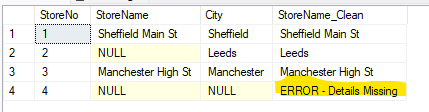 The COALESCE function can be used in a variety of situations where you need to deal with NULL values in SQL queries. It is a very versatile function that can make your queries more efficient and easier to read.
Alternatives to COALESCE
Some alternatives to using COALESCE are outlined belowusing a CASE statement to handle NULLS
SELECT ds.* , coalesce(StoreName, City, ‘ERROR – Details Missing’) as StoreName_Clean , case when storename is null then city else storename end as StoreName_Clean_CS FROM [SelectDistinctTIPS].[dbo].[Dim_Store] ds The case statement can perform a similar function to COALESCE, but can be more flexible. But if you need to extend it to using multiple values it can become onerous Using three examplesSELECT ds.*
, coalesce(StoreName, City, ‘ERROR – Details Missing’) as StoreName_Clean
, case when storename is null then city else storename end as StoreName_Clean_CS
, case
when storename is null and city is null then ‘ERROR – Details Missing’
when storename is null and city is not null then city
else storename end as StoreName_Clean_CS_3
FROM [SelectDistinctTIPS].[dbo].[Dim_Store] ds
You can see how the complexity using the case statement quickly grows with multiple options, each option needs to be checked and the order of the when clauses need to be carefully considered You can find out more about CASE statements by reading this post CASE statements in SQLusing ISNULL to handle NULLS
SELECT ds.*
, coalesce(StoreName, City, ‘ERROR – Details Missing’) as StoreName_Clean
, case when storename is null then city else storename end as StoreName_Clean_CS
, case
when storename is null and city is null then ‘ERROR – Details Missing’
when storename is null and city is not null then city
else storename end as StoreName_Clean_CS_3
, ISNULL(storename, city) as Storename_Clean_ISNULL
FROM [SelectDistinctTIPS].[dbo].[Dim_Store] ds
Using ISNULL is an alternative to using COALESCE, being simple and efficient to write. But like CASE statements, when you need to add multiple options it can grow in complexity quite quicklySELECT ds.*
, coalesce(StoreName, City, ‘ERROR – Details Missing’) as StoreName_Clean
, case when storename is null then city else storename end as StoreName_Clean_CS
, case
when storename is null and city is null then ‘ERROR – Details Missing’
when storename is null and city is not null then city
else storename end as StoreName_Clean_CS_3
, ISNULL(storename, city) as Storename_Clean_ISNULL
, ISNULL(ISNULL(storename, city), ‘ERROR – Details Missing’) as Storename_Clean_ISNULL_3
FROM [SelectDistinctTIPS].[dbo].[Dim_Store] ds

Common use cases
Here are some other common uses for using the COALESCE function:- You can use the COALESCE function to replace multiple NULL values with a single value.
- You can use the COALESCE function to check if a value is null.
- You can use the COALESCE function to create a default value for a column.
 LinkedIn