
SQL Server Integration Services (SSIS)
SQL Server Integration Services (SSIS) is a platform for building data integration solutions. It is a component of the Microsoft integration services that can be used to perform a broad range of data migration tasks. It can also build ETL (extract, transform, and load) packages for data warehousing. SSIS is a part of the Microsoft SQL Server database suite, initially an on premise tool a cloud-based versions is now available.
SSIS can extract and transform data from a wide variety of sources such as XML data files, flat files, and relational data sources. It can then load the data into one or more destinations. It includes a rich set of built-in tasks and transformations as well as graphical tools for building packages. It also has an SSIS Catalog database to store, run, and manage packages.
On-Premises SSIS
On-premises SSIS is a powerful tool for data integration that allows you to create and manage ETL packages on your own servers. With on-premises SSIS, you can:
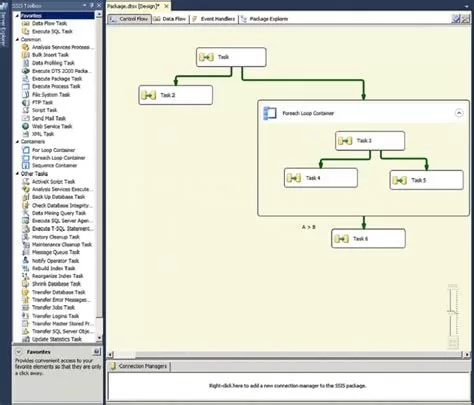
Create and manage ETL packages using SQL Server Data Tools (SSDT) or SQL Server Management Studio (SSMS).
Deploy and run packages on your own servers.
Use a variety of data sources and destinations, including flat files, Excel spreadsheets, and SQL Server databases.
Integration with Azure Data Factory (ADF)
Integration with Azure Data Factory (ADF)
Azure Data Factory (ADF) is a cloud-based data integration service that allows you to create, schedule, and manage data pipelines. ADF provides benefits over on-premises SSIS, including:
Scalability: ADF can handle large-scale data integration tasks. These might be difficult or impossible to perform with on-premises SSIS.
Cost-effectiveness: ADF is a cost-effective solution for data integration, as you only pay for the resources you use.
Integration with other Azure services. ADF integrates with other Azure services, such as Blob Storage and SQL Database.
It is possible to migrate your on-premises SSIS workloads to ADF using the Azure-SSIS Integration Runtime (IR).

Our Expertise with SSIS
At Select Distinct, we have the expertise and experience to help you leverage SSIS for your data integration needs. We can help you with:
- Designing and developing data pipelines that can ingest data from disparate data sources. Including on-premises databases, cloud data stores, SaaS applications, and big data platforms.
- Implementing ETL (extract, transform, and load) or ELT (extract, load, and transform) processes.
- Migrating and modernizing your existing SSIS packages to Azure Data Factory. Allowing you to take advantage of the cost savings, scalability, and performance benefits of the cloud.
- Optimizing and enhancing your data pipelines using best practices. This includes data quality, data lineage, data security, and data governance.
We deliver high-quality and cost-effective data integration solutions that meet your specific needs. We will work with you to understand your data challenges and opportunities. Allowing us to provide you with a tailored and pragmatic solutions.
If you are interested in our ADF services, please contact us today whether you’re a small business looking for some data consultancy support or enterprise company to discuss your requirements and get a free quote. We look forward to hearing from you and working with you.
SSIS Consultancy
If you are looking for help and support with SQL Server Integration Services (SSIS), speak to us to see how we can help.
Frequently Asked Questions
What is SSIS and what does SSIS stand for?
SSIS stands for SQL Server Integration Services. It is an enterprise-grade data integration and workflow tool developed by Microsoft, primarily used for ETL processes which stands for Extract, Transform, and Load.
It allows you to move data from various sources, clean or format it to meet your specific needs, and load it into destinations like data warehouses or databases.
What is the difference between SSIS and Azure Data Factory (ADF)?
SSIS is primarily an on-premises ETL tool used for complex data transformations within a local network. Azure Data Factory is a cloud-based integration service designed for scalability and cloud-native sources. However, they aren't mutually exclusive; you can run SSIS packages within ADF using the Azure-SSIS Integration Runtime
Can we migrate our existing on-premises SSIS packages to the cloud?
Yes. You can migrate your existing SSIS workloads to Azure using a "lift-and-shift" approach. This involves moving your packages to the Azure-SSIS Integration Runtime in ADF, which allows you to keep your existing logic while gaining the scalability and maintenance benefits of the cloud
Does SSIS support modern data sources like SaaS applications and APIs?
While SSIS was originally built for relational databases and flat files, it can connect to modern SaaS applications (like Salesforce or Dynamics 365) and REST APIs through custom components or third-party adapters. We specialize in extending SSIS to ensure it integrates seamlessly with your modern tech stack
Is SSIS still a viable tool for new Data Warehousing projects?
SSIS remains a robust and highly capable tool, especially for organizations with a heavy investment in SQL Server. For hybrid environments where data stays partially on-premise for security or compliance, SSIS is often the most efficient and cost-effective way to manage your ETL pipelines
How does SSIS handle data security and compliance?
SSIS provides enterprise-grade security through package encryption, digital signatures, and integration with Windows Authentication. When managing sensitive data, we implement best practices such as sensitive parameter logging and secure connection strings to ensure your data remains protected throughout the integration process