
Published: October 2024 | Last Updated: October 2026
Choosing the right Power BI licence can be challenging, particularly as Microsoft continues to expand its analytics platform with Microsoft Fabric. From small businesses sharing a handful of reports to enterprises running large-scale analytics environments, understanding the differences between Power BI Free, Pro, Premium Per User and Fabric capacity licensing is essential.
This guide explains the available Power BI licences, compares pricing and features, and helps you identify the most cost-effective option for your organisation. If you require expert guidance, our Power BI consultants can help assess your reporting requirements and licensing needs.
Power BI Licensing at a Glance
- Power BI Free: Create reports and analyse data individually.
- Power BI Pro: Share, collaborate and distribute reports across your organisation.
- Power BI Premium Per User (PPU): Unlock advanced analytics and enterprise features.
- Microsoft Fabric Capacity: Enterprise-scale analytics and reporting with dedicated capacity.
Unsure Which Power BI Licence You Need?
Choosing the wrong licensing model can significantly increase costs and limit your organisation's reporting capabilities.
Our Power BI specialists can help you compare Power BI Pro, Premium Per User and Microsoft Fabric licensing to identify the most cost-effective solution for your users, reporting requirements and growth plans.
Power BI Licensing Comparison
Licence | Best For | Sharing | Indicative Monthly Price |
Power BI Free | Individual Users | No | Free |
Power BI Pro | Teams | Yes | £10.80 / User |
Power BI Premium per User | Advanced Analytics | Yes | £18.50 / User |
Microsoft Fabric Capacity | Enterprise Analytics | Dedicated Capacity | Capacity-Based |
Pricing shown is correct at the time of writing and may be subject to change.
Please refer to Microsoft’s official pricing documentation for the latest licensing information.
What are the different Power BI licence types and UK prices in 2026?
Microsoft offers four main Power BI licensing tiers in the UK: Power BI Free (£0 for individual report creation), Power BI Pro (£10.80 per user/month for team sharing and collaboration), Power BI Premium Per User (PPU) (£18.50 per user/month for larger models and advanced analytics), and Microsoft Fabric Capacity (capacity-based pricing for enterprise-scale workloads).
Power BI Free
Power BI Free is designed for individuals who want to explore Power BI, build reports and analyse data without purchasing a licence. It’s often used for learning the platform, creating personal dashboards or evaluating Power BI before a wider rollout.
Power BI Pro
Power BI Pro is the licence most organisations start with. It enables users to publish, share and collaborate on reports and dashboards, making it suitable for teams that need to distribute insights across the business.
Power BI Premium Per User (PPU)
Premium Per User builds on the capabilities of Power BI Pro by providing access to additional features aimed at advanced analytics and larger reporting environments. It can be a practical option for organisations that need enterprise functionality without investing in dedicated capacity.
Comparing Power BI Licence Features
While pricing is often the starting point, it’s equally important to understand the differences in functionality available under each licensing model.
The comparison below highlights some of the capabilities included with Power BI Free, Pro and Premium Per User.
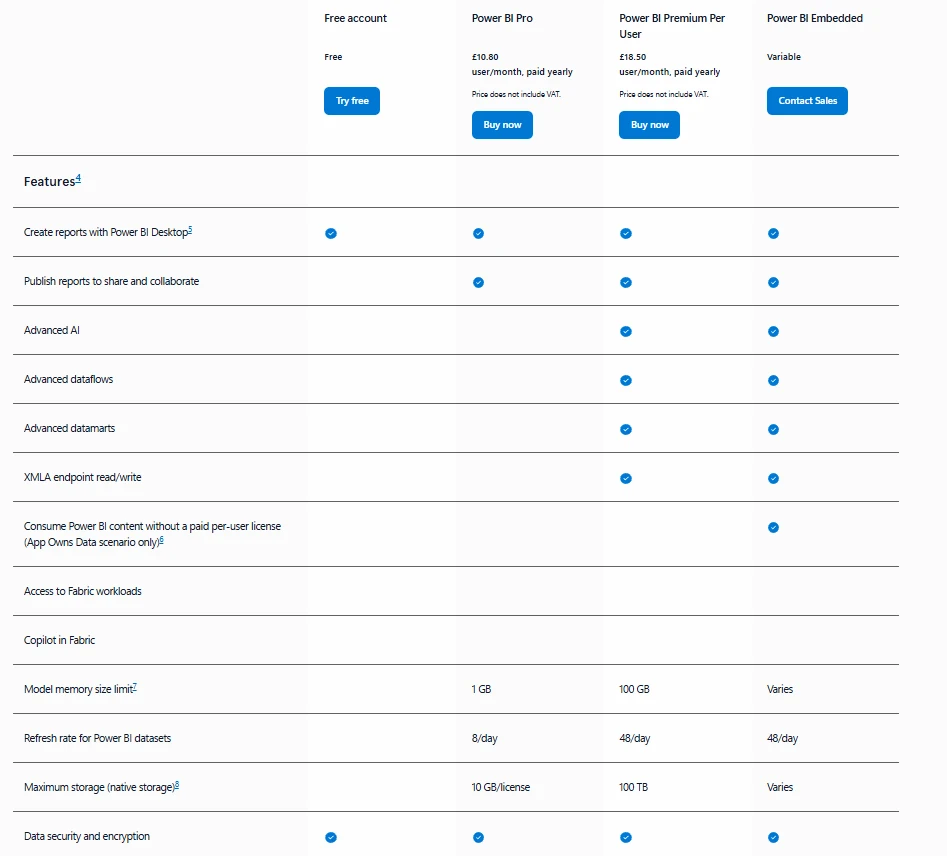
Microsoft Power BI licence feature comparison showing functionality available across Free, Pro and Premium Per User licences.
Microsoft Fabric Capacity
Microsoft Fabric Capacity provides dedicated resources for reporting and analytics workloads. Organisations evaluating Microsoft Fabric often benefit from specialist guidance around architecture, governance and licensing through our Power BI consulting and Microsoft Fabric consulting services.
Is Power BI Pro included with Microsoft 365 E3 or E5 licences?
Power BI Pro is included at no extra cost with Microsoft 365 E5 (and Office 365 E5) subscriptions, meaning E5 users do not need separate Power BI Pro licences. Organizations on Microsoft 365 Business Basic, Business Standard, Business Premium, or E3 only receive Power BI Free by default and must purchase add-on Power BI Pro licences to share reports.
Many organisations already have Power BI functionality available through their existing Microsoft 365 subscription.
Before purchasing new licences, it’s worth reviewing your existing Microsoft licensing agreement to avoid unnecessary costs.
If you’re considering Microsoft Fabric, licensing requirements can vary depending on how reports are created, shared and consumed across the organisation.
How do you choose the right Power BI licence for your organisation?
Most small and mid-sized businesses start with Power BI Pro for every report creator and viewer, upgrading only specific analysts to Premium Per User (PPU) if they need datasets larger than 1 GB or paginated reports. Once an organization reaches roughly 250–500+ report consumers or needs unified data engineering, Microsoft Fabric Capacity (F64 or above) becomes more cost-effective because free viewers can consume shared reports without individual Pro licences
Choosing the right Power BI licence comes down to how your organisation creates, shares and consumes data.
- Power BI Free is suitable for individuals learning Power BI or creating personal reports.
- Power BI Pro is typically the best starting point for organisations that need to share reports and collaborate across teams.
- Power BI Premium Per User (PPU) provides access to advanced analytics features without the need for dedicated capacity.
- Microsoft Fabric Capacity is designed for organisations with larger reporting environments and broader analytics requirements.
- Organisations with Microsoft 365 E5 licences may already have access to Power BI Pro and should review their existing licensing before purchasing additional licences.
- Power BI licensing and pricing can change over time, so it’s important to review your licensing strategy regularly.
The right choice will depend on your reporting requirements, user numbers, growth plans and existing Microsoft investments.
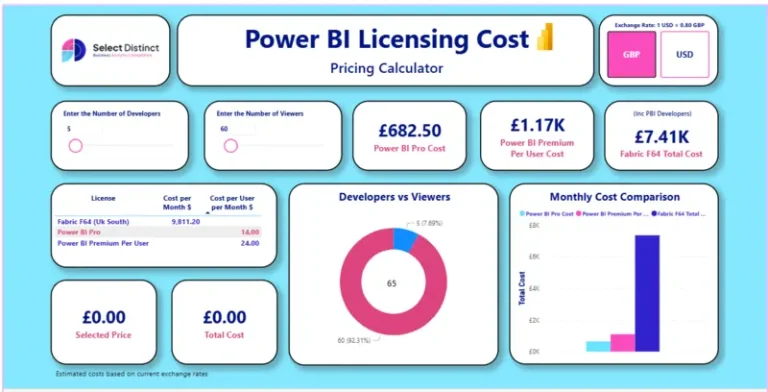
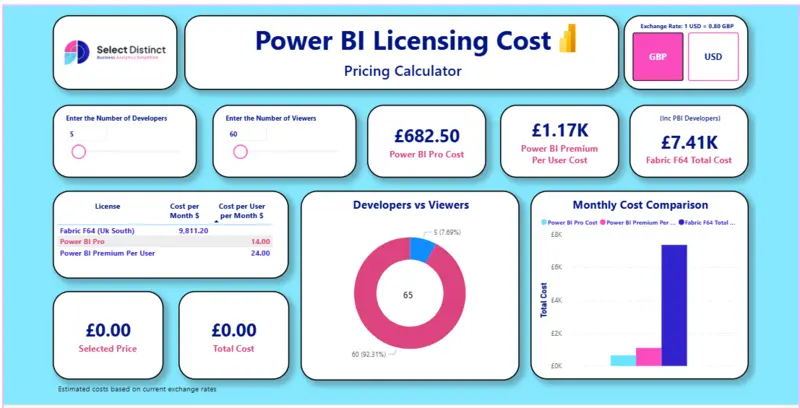
Power BI Licensing Calculator
Estimate the cost of Power BI Pro, Premium Per User and Microsoft Fabric licensing based on your user numbers and reporting requirements.

Simon Harrison
Simon Harrison is the founder and director of Select Distinct Limited and a Business Intelligence expert.
He specialises in SQL Server architecture, Power BI, and enterprise data warehousing.
Power BI Licensing FAQs
How much does Power BI cost per user in the UK?
In the UK, Power BI Free costs £0 for individual use,
Power BI Pro costs £10.80 per user per month,
and Power BI Premium Per User (PPU) costs £18.50 per user per month (billed annually).
Enterprise organisations can also purchase consumption-based Microsoft Fabric Capacity starting from around £200/month for an F2 SKU up to F64+ for unlimited free report viewers.What is the difference between Power BI Free and Power BI Pro?
Power BI Free is designed for individual users who want to create and analyse reports. Power BI Pro adds report sharing, collaboration and workspace functionality, making it suitable for business use.
Is Power BI included with Microsoft 365?
Some Microsoft 365 subscriptions include Power BI functionality. For example, Microsoft 365 E5 includes Power BI Pro, which may reduce the need for additional licensing.
What is Power BI Premium Per User (PPU)?
Power BI Premium Per User provides access to advanced Power BI features, including larger models and enhanced analytics capabilities, without requiring dedicated capacity.
Which Power BI licence is right for my organisation?
The right licence depends on your reporting requirements, user numbers, collaboration needs and future growth plans. Organisations often start with Power BI Pro before evaluating Premium Per User or Microsoft Fabric Capacity as their requirements evolve.
Do report viewers need a Power BI Pro licence to view shared dashboards?
Yes, unless your workspace is hosted on a Microsoft Fabric F64 (or higher) capacity. On standard shared capacity, both the report creator and every colleague viewing or interacting with a shared Power BI dashboard must hold at least a Power BI Pro (£10.80/month) or Premium Per User (£18.50/month) licence.