If your team relies on Power BI or Data Studio for daily decision-making, you have likely hit a familiar, frustrating wall. When your business was smaller, your database handled everything just fine. But as transaction volumes grew, customer data multiplied, and more department heads started opening dashboards, things began to slow down.
When key reports take minutes to load, people stop trusting the data and your finance team ends up back in Excel trying to piece the real story together.
For growing mid-market organisations, holding onto legacy SQL servers or traditional on-premises data setups is quietly holding back growth. Here are why forward-thinking companies are modernising their infrastructure – and how they are doing it without bloated budgets or disruptive 12-month IT projects.
The Hidden Cost of Legacy Data Infrastructure
Most mid-market firms don’t struggle because their data is wrong; they struggle because their setup makes simple things hard. Sticking with legacy SQL servers or traditional on-premises infrastructure usually creates three very real headaches:
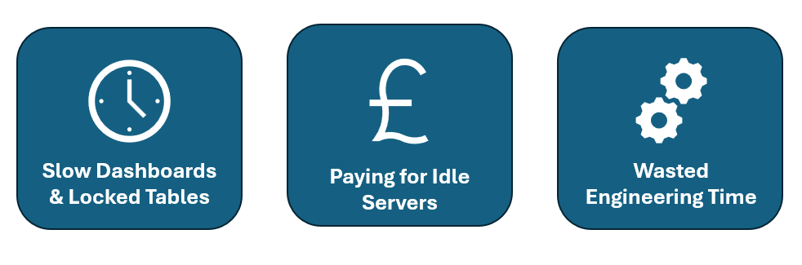
1. Slow Dashboards and Locked Tables: When your reporting tools pull data straight from your operational database, heavy queries cause major resource contention. Dashboards time out, executives get frustrated, and heavy reports can even lock up core tables and slow down live business applications.
2. Paying for Idle Servers: Traditional hosting means paying fixed monthly fees 24/7 for server clusters or cloud instances even when no one is looking at a report overnight or over the weekend. You’re effectively paying for capacity you aren’t using.
3. Wasted Engineering Time: Instead of building things that drive revenue, your technical team spends hours tuning slow queries, fixing broken pipelines, and managing manual indexes just to keep the lights on.
Why Google BigQuery is Winning Over the Mid-Market
Enterprise-grade data infrastructure used to take six-figure budgets and a dedicated team of database engineers. Cloud platforms have completely changed that, giving growing companies access to the same heavy-duty processing power that tech giants use, without the enterprise price tag.
BigQuery makes sense for mid-market teams for a few simple reasons:
- Pay-per-Query: Instead of paying for a dedicated server running 24/7, you only pay for the specific data your queries scan. When everyone logs off for the weekend, your compute costs drop to zero.
- No Server Maintenance: There are no servers to patch, no clusters to size, and no manual indexes to manage. It scales automatically in the background, keeping your technical team free from routine administration.
- Zero-Lag Dashboards: Whether you are using Power BI or Data Studio, queries run fast across large datasets, giving your leadership team reliable numbers without putting pressure on your live applications.
The Four Layers You Need for a Modern Data Stack
The biggest mistake companies make when upgrading their data stack is trying to build a massive, overly complex enterprise data warehouse right out of the gate. A modern data warehouse doesn’t need to be complicated.
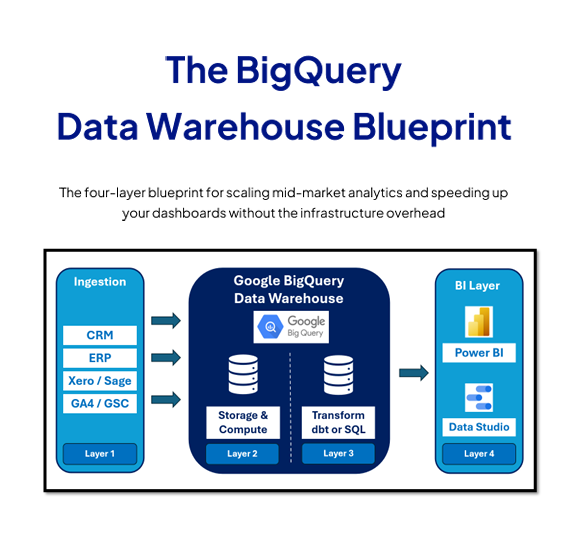
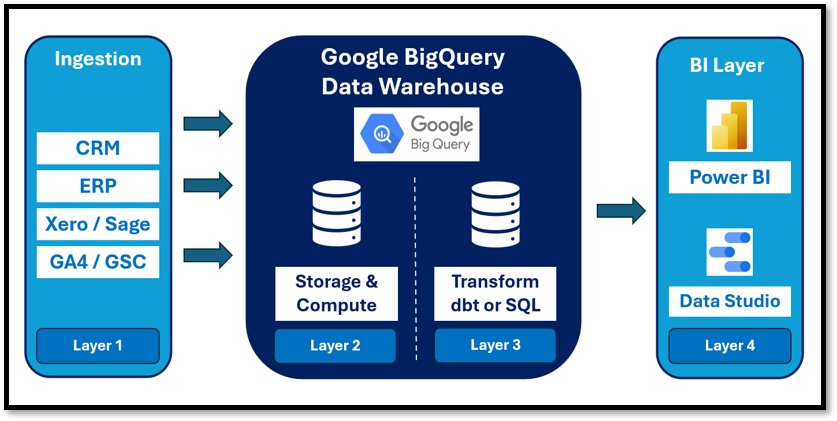
By following a clean, four-layer architecture, you can achieve a single source of truth without breaking the budget:
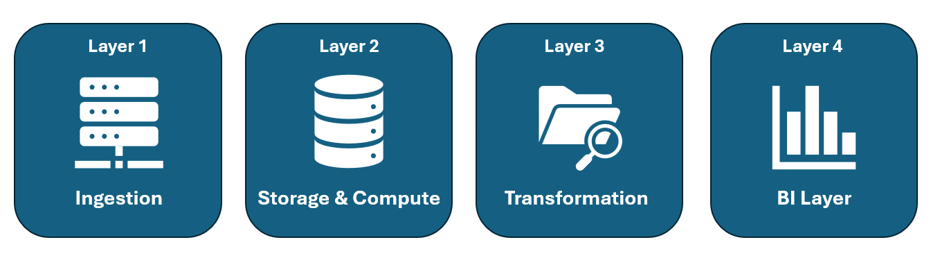
Layer 1: Lightweight Ingestion
Your warehouse should easily pull data from your CRM, ERP, Xero or Sage, and marketing platforms without heavy custom engineering. Keep your ingestion tools simple, minimal, and automated so data flows smoothly into staging areas.
Layer 2: Serverless Storage & Compute
Utilise cloud-native storage like BigQuery, which offers low-cost data storage alongside scalable, dynamic compute power. This layer handles partitioning and clustering automatically behind the scenes, keeping your data secure and accessible.
Layer 3: Controlled Transformation
This is where business logic lives. Use modern tooling like SQL or dbt to clean, structure, and build incremental transformation models. Adding automated data quality tests here ensures that bad data never makes it to your executive dashboards.
Layer 4: The Semantic & BI Layer
The final layer bridges the gap between raw data and business users. By establishing a star schema model with clean, conformed tables and reusable measures, you ensure everyone across the company looks at the exact same numbers. Point Power BI or Data Studio here for lightning-fast executive reporting.
Common Pitfalls to Avoid During Migration
As you plan your modernisation journey, watch out for these traps that frequently derail mid-market data projects:

- Over-Engineering Early: Buying heavy enterprise feature sets before your query volume or team size justifies the complexity.
- Skipping the Semantic Layer: Letting different departments build conflicting custom metrics in their spreadsheets instead of agreeing on a single organisational KPI dictionary.
- Neglecting Data Quality: Failing to implement basic automated tests, leading to broken reports and a loss of trust from leadership.
- Direct-to-App Queries: Continuing to point heavy analytics tools directly at live transactional databases rather than separating operational and analytical workloads.
Ready to Map Out Your Migration?
You don’t need a massive, disruptive 12-month IT project to modernise your analytics stack. Moving your workloads to a serverless environment can be done cleanly, cost-effectively, and tailored specifically to your business goals.
Get the BigQuery Data Blueprint
We’ve put together a complete, framework designed specifically for mid-market teams looking to scale their analytics, cut cloud waste, and accelerate their reporting.
If you’d rather have an expert team help scope and build your migration rather than doing it entirely in-house, explore our Google BigQuery consulting services to get started.